Feature
Unpack after moving without losing a thing
In your new home, open each box and check it item by item. The app shows how many boxes are still left to open in each room.
How it works
Start opening the box
On the box, tap «Start opening». Its status changes to «Opening», and everyone sees that someone is working on it.
One item at a time
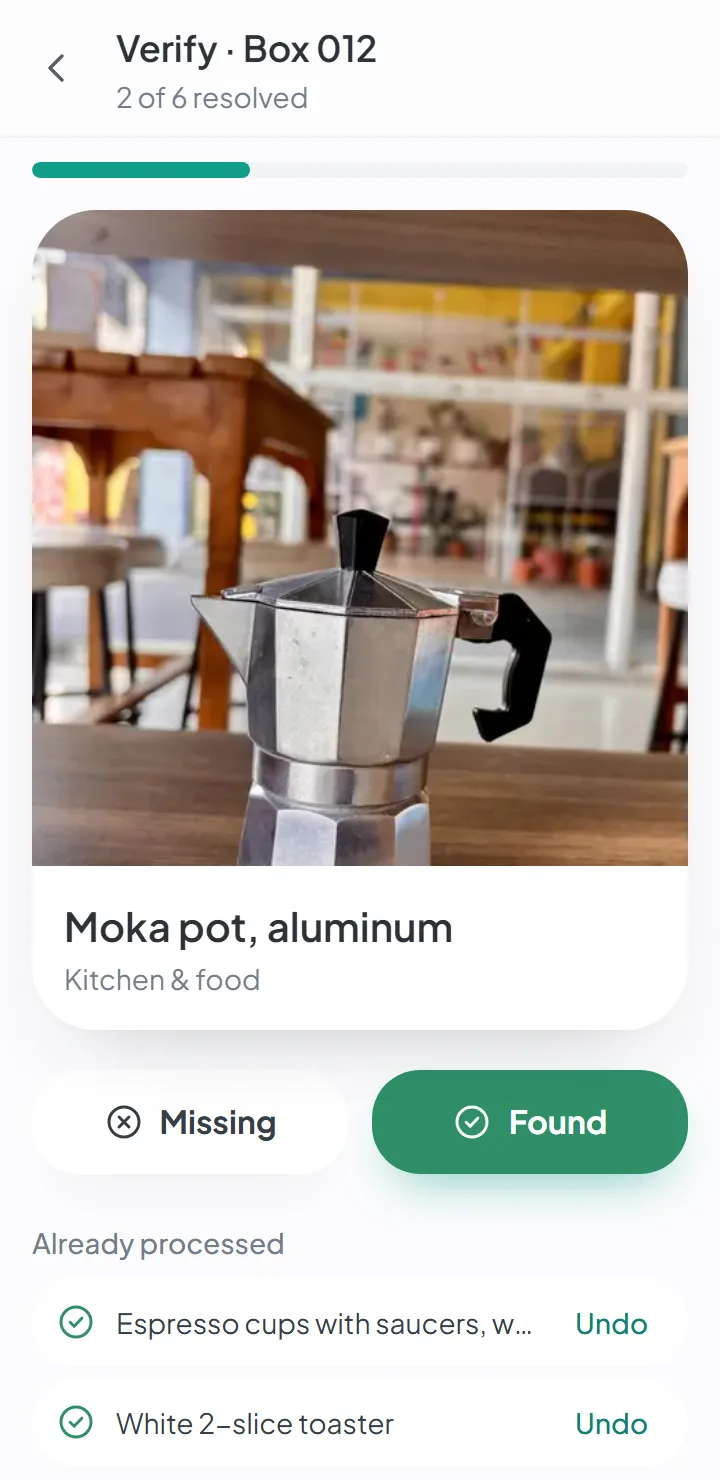
The app shows a large photo of the first item. Found it? «Found». Not there? «Missing».
Keep going to the end
Your progress shows at the top — «2 of 6 resolved». One tap on «Undo» fixes a mistake.
See what's left in the new home
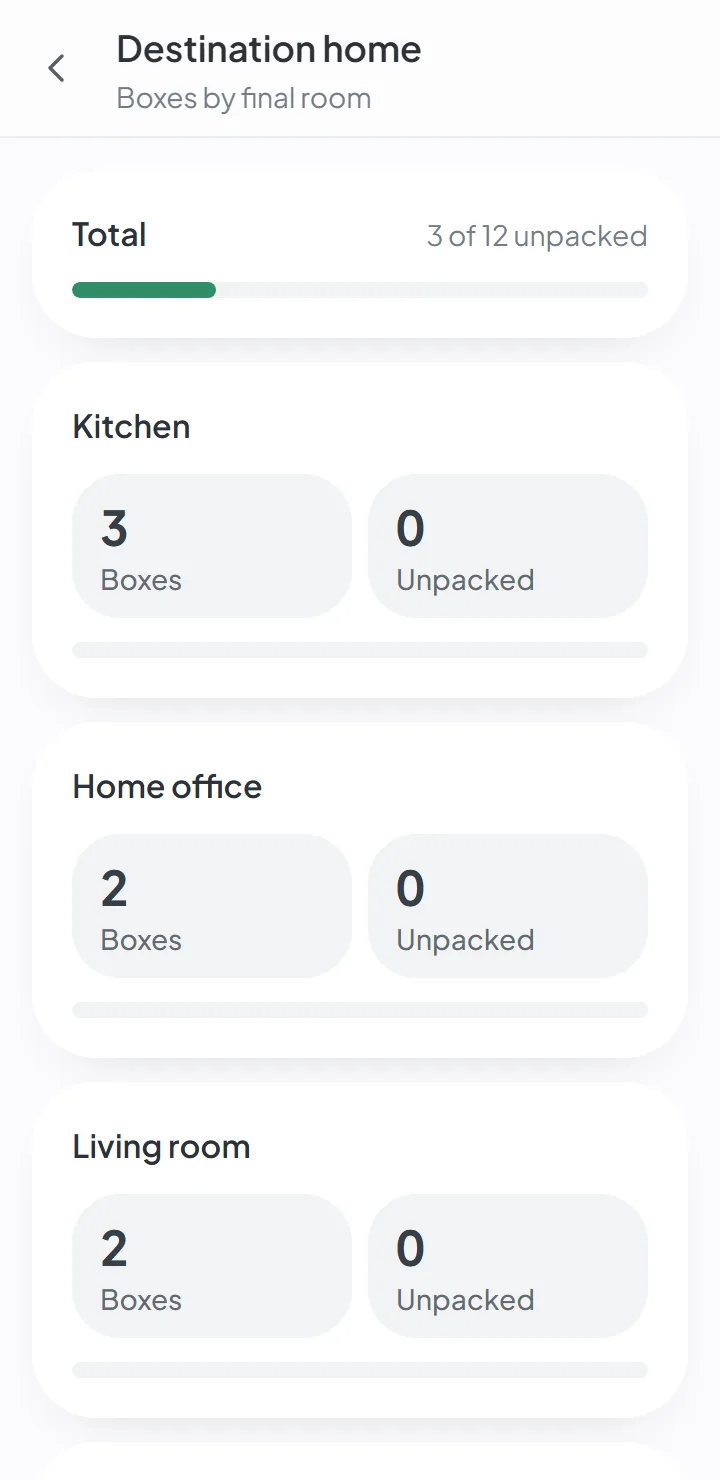
The destination home page shows, room by room, how many boxes have been unpacked and how many are left.
Unpacking boxes with the list in your hand
Almost everyone unpacks the same way: open the box, take everything out, and only weeks later notice something is missing — when you no longer know whether it broke, stayed behind at the old place or is in another box.
With a list of what went into each box, unpacking becomes checking. Each item has the photo you took when you packed it; when you open the box, you confirm it. If something is missing, you know right away, and you know which box it should have been in.
How to unpack after moving: where to start
Whether you’re moving into an apartment or moving house, the best approach is to unpack in the order you’ll need things:
- The bathroom and the kitchen first. The bathroom is quick and you use it right away. In the kitchen, start with what you use every day — plates, glasses, silverware, a pot. The rest of the kitchen boxes can wait.
- Then the bedrooms. Bedding and this week’s clothes. Full closets come later.
- Then the rest — wherever you work or study, if that’s at home, then the living room, and last the books, decorations and pictures.
On the first night, set up the beds and open only the first-night box, if you packed one. The full order, room by room, is in what to do after moving.
Tips for unpacking quickly and efficiently
Unpacking fast by putting everything anywhere just to make the boxes go away means moving it all again later. What actually keeps it efficient:
- Set each box down in its room before you open anything.
- Decide where things go while the closets are still empty, then open that room’s boxes.
- Finish one box before you open another. A box that’s open and half-emptied is worse than one that’s still sealed.
- Break down the empty box right away and take it out of the room.
- Anything without a place goes into a single box, the last one you deal with.
How long does it take to unpack after moving?
There’s no honest single number: it depends on how many boxes you have and how much time you can give it. What makes it shorter is the order — with the bathroom, the kitchen and the bedrooms done, the house works while the rest waits. And not every box has to be opened at all.
The statuses of a box
A box goes through four statuses, and every member of the move sees them:
- Preparing — still being filled.
- Sealed — closed and ready for the move.
- Opening — someone has started unpacking it.
- Unpacked — empty and checked.
That’s what lets several people unpack at the same time without opening the same box twice.
The destination home, room by room
Each box goes to a room — a room in the new home, chosen when you packed. The destination home page brings them together: how many boxes are headed for the kitchen, for each bedroom, for the living room, and how many from each room have already been unpacked.
That’s how you know, at the end of the first weekend, what’s still left to open — and can decide whether the box of holiday decorations can wait until December.
And what you leave closed
You don’t have to unpack everything. Boxes going to the garage, the basement or a storage room can stay closed — they’re still in the app with the list of what’s inside, and a search finds whatever you need in there, whenever you need it.
Good to know
- It checks what was recorded when you packed. Something that never made it onto the list doesn't show up to be checked.
- «Missing» gets recorded, but the app doesn't know where the item is — only that it didn't arrive in that box.
Questions about this
Does it work without internet?
Yes. You can view, search and add items and photos with no connection; the app syncs when you’re back online.
AI suggestions and dictating notes need a connection.
Keep reading
Guide
What to do after moving
What to unpack first, your first night in the new house and the order to take the rooms in.
Feature
Forgot where you put it? Search.
Search by word and see the box and where it is. Forgives typos and works offline.
Feature
Add items to your moving inventory with just the camera
Snap, save, next. The photo is the only required field.
Start your move with everything in its place
Create an account, photograph your first box and see how quick it is.
Create a free accountStart using it now. It’s free.